
In this tutorial, I have explained how to add Login with Facebook, Twitter and Google functionality to your website using PHP. I have used HybridAuth PHP library to achieve this.
List of identity providers supported by HybridAuth Library.
- Yahoo
- Live
- AOL
- MySpace
- Github


Follow the below steps to create Login with Facebook,Twitter and Google widget. Below image explains how hybridAuth library works. 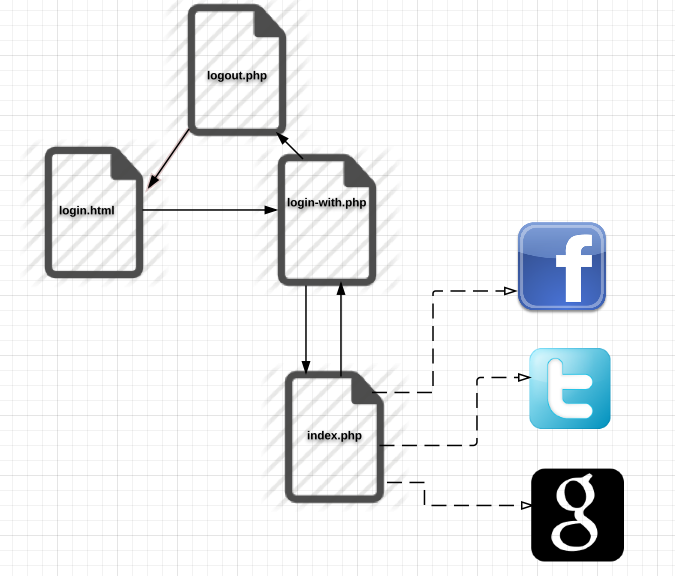
Step 1) Download HybridAuth PHP library from Github .
Step 2). You need to get Developer API(OAuth) Key and Secret from Facebook, Twitter and Google.
Step 3). Create config.php and add below code to the file.
$config = array("base_url" => "YOUR_WEBSITE_OAUTH_URL",
		"providers" => array (
			"Google" => array (
				"enabled" => true,
				"keys"    => array ( "id" => "YOUR_GOOGLE_API_KEY", "secret" => "YOUR_GOOGLE_API_SECRET" ),

			),

			"Facebook" => array (
				"enabled" => true,
				"keys"    => array ( "id" => "FACEBOOK_DEVELOER_KEY", "secret" => "FACEBOOK_SECRET" ),
				"scope" => "email, user_about_me, user_birthday, user_hometown"	//optional.
			),

			"Twitter" => array (
				"enabled" => true,
				"keys"    => array ( "key" => "TWITTER_DEVELOPER_KEY", "secret" => "TWITTER_SECRET" )
			),
		),
		// if you want to enable logging, set 'debug_mode' to true  then provide a writable file by the web server on "debug_file"
		"debug_mode" => false,
		"debug_file" => "debug.log",
	);
Note: Set API key and secrets for Google, Facebook and Twitter. base_url is the OAuth Callback page. In demo page, base_url=”http://hayageek.com/examples/oauth/hybridauth/hybridauth/index.php”. Content of the base_url is.
<?php
require_once( "Hybrid/Auth.php" );
require_once( "Hybrid/Endpoint.php" );
Hybrid_Endpoint::process();
?>
Note: In Google API OAuth Settings set your redirect URL like this http://hayageek.com/examples/oauth/hybridauth/hybridauth/index.php?hauth.done=Google
Step 4). Create login.html and add below code
<html>
<body>
	<a href="login-with.php?provider=Facebook">Login With Facebook</a>
	<a href="login-with.php?provider=Twitter">Login With Twitter</a>
	<a href="login-with.php?provider=Google">Login With Google</a>

</body>
</html>
Step 5) Create login-with.php and add below code
<?php
session_start();
include('config.php');
include('hybridauth/Hybrid/Auth.php');
if(isset($_GET['provider']))
{
$provider = $_GET['provider'];
try{
	$hybridauth = new Hybrid_Auth( $config );
	$authProvider = $hybridauth->authenticate($provider);
	$user_profile = $authProvider->getUserProfile();
	if($user_profile && isset($user_profile->identifier))
	{
		echo "<b>Name</b> :".$user_profile->displayName."<br>";
		echo "<b>Profile URL</b> :".$user_profile->profileURL."<br>";
		echo "<b>Image</b> :".$user_profile->photoURL."<br> ";
		echo "<img src='".$user_profile->photoURL."'/><br>";
		echo "<b>Email</b> :".$user_profile->email."<br>";
		echo "<br> <a href='logout.php'>Logout</a>";
	}

	}
	catch( Exception $e )
	{
		 switch( $e->getCode() )
		 {
                case 0 : echo "Unspecified error."; break;
                case 1 : echo "Hybridauth configuration error."; break;
                case 2 : echo "Provider not properly configured."; break;
                case 3 : echo "Unknown or disabled provider."; break;
                case 4 : echo "Missing provider application credentials."; break;
                case 5 : echo "Authentication failed The user has canceled the authentication or the provider refused the connection.";
                         break;
                case 6 : echo "User profile request failed. Most likely the user is not connected to the provider and he should to authenticate again.";
                         $authProvider->logout();
                         break;
                case 7 : echo "User not connected to the provider.";
                         $authProvider->logout();
                         break;
                case 8 : echo "Provider does not support this feature."; break;
        }

        echo "<br /><br /><b>Original error message:</b> " . $e->getMessage();

        echo "<hr /><h3>Trace</h3> <pre>" . $e->getTraceAsString() . "</pre>";

	}

}
?>
Step 6) Create logout.php with the below code.
<?php
session_start();
session_destroy();
header("Location: login.html");
?>
