
In PLIST tutorial, I have covered how to Read Plist data and how to Generate Plist with Objective-C in iOS.
What is PLIST?
Plist stands for Property List. Plist is used to store data in hierarchical manner.A Property List can contain containers and primitives.
- Containers – Array, Dictionary
- Primitives – Boolean, String, Number(Integer,Float), Date, Data
A Container can contain other containers and primitive data-types.
i.e. Dictionary can contain other Dictionaries,Arrays and Primitives. Array can contain other Dictionaries,Arrays,Primitives.
Below Image shows Property List types and their representation in Objective-C.

Note: <data> element handles Base64 encoded data. So you need to enter Base64 encoded value in <data> element.This value is automatically decoded and can be read using NSData.
I am going to show how to read the below sample PLIST and generate the same with objective-C.
Sample Plist: This contains all primitives and containers.
<?xml version="1.0" encoding="UTF-8"?>
<!DOCTYPE plist PUBLIC "-//Apple//DTD PLIST 1.0//EN" "http://www.apple.com/DTDs/PropertyList-1.0.dtd">
<plist version="1.0">
<dict>
	<key>name</key>
	<string>Ravi</string>
	<key>age</key>
	<integer>31</integer>
	<key>photo</key>
	<data>bXkgcGhvdG8=</data>
	<key>dob</key>
	<date>1981-05-16T11:32:06Z</date>
	<key>indian</key>
	<true/>
	<key>friends</key>
	<array>
		<string>Shanker</string>
		<string>Shyam</string>
		<string>PK</string>
	</array>
	<key>subjects</key>
	<dict>
		<key>english</key>
		<real>90.12</real>
		<key>maths</key>
		<real>80.12</real>
		<key>science</key>
		<real>90.43</real>
	</dict>
</dict>
</plist>
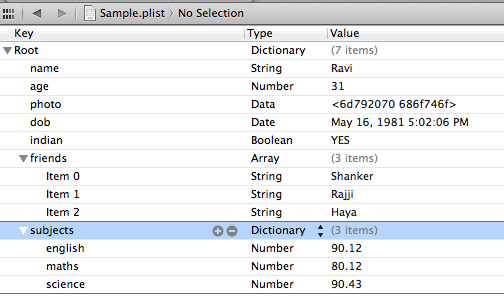
If you open the PLIST with XCode, it looks like the below image.
Reading/Writing Plist
NSPropertyListSerialization class provides API to read/write PLIST. Using this API, I have written wrapper functions to Read/Write Plist.
Content of Plist.h
#import <Foundation/Foundation.h>

@interface Plist : NSObject

//Convert Object(Dictionary,Array) to Plist(NSData)
+(NSData *) objToPlistAsData:(id)obj;

//Convert Object(Dictionary,Array) to Plist(NSString)
+(NSString *) objToPlistAsString:(id)obj;

//Convert Plist(NSData) to Object(Array,Dictionary)
+(id) plistToObjectFromData:(NSData *)data;

//Convert Plist(NSString) to Object(Array,Dictionary)
+(id) plistToObjectFromString:(NSString*)str;

@end
Content of Plist.m
#import "Plist.h"

@implementation Plist

+(NSData *) objToPlistAsData:(id)obj
{
    NSError * error=nil;
    NSPropertyListFormat format=NSPropertyListXMLFormat_v1_0;
    NSData * data =  [NSPropertyListSerialization dataWithPropertyList:obj format:format options:NSPropertyListImmutable error:&error];
    return data;

}
+(NSString *) objToPlistAsString:(id)obj
{
    NSData * data =[self objToPlistAsData:obj];
    return [[NSString alloc] initWithData:data encoding:NSUTF8StringEncoding];

}

+(id) plistToObjectFromData:(NSData *)data
{
    NSError * error=nil;
    NSPropertyListFormat format=NSPropertyListXMLFormat_v1_0;
    id plist = [NSPropertyListSerialization propertyListWithData:data
                                                         options:NSPropertyListImmutable
                                                          format:&format error:&error] ;

    return plist;

}
+(id) plistToObjectFromString:(NSString*)str
{
    NSData * data =[str dataUsingEncoding:NSUTF8StringEncoding];
    return [self plistToObjectFromData:data];
}

@end
Read Plist Data
[Plist plistToObjectFromData:], [Plist plistToObjectFromString] functions are used to convert PLIST to Container(NSArray, NSDictionary).
-(void) readPlist
{
    // Override point for customization after application launch.

    NSString * plistStr =@"<?xml version=\"1.0\" encoding=\"UTF-8\"?><!DOCTYPE plist PUBLIC \"-//Apple//DTD PLIST 1.0//EN\" \"http://www.apple.com/DTDs/PropertyList-1.0.dtd\"><plist version=\"1.0\"><dict>	<key>name</key>	<string>Ravi</string>	<key>age</key>	<integer>31</integer>	<key>photo</key>	<data>bXkgcGhvdG8=</data>	<key>dob</key>	<date>1981-05-16T11:32:06Z</date>	<key>indian</key>	<true/>	<key>friends</key>	<array>		<string>Shanker</string>		<string>Rajji</string>		<string>Haya</string>	</array>	<key>subjects</key>	<dict>		<key>english</key>		<real>90.12</real>		<key>maths</key>		<real>80.12</real>		<key>science</key>		<real>90.43</real>	</dict></dict></plist>";

    //Convert the PLIST to Dictionary
    NSDictionary * dict =[Plist plistToObjectFromString:plistStr];

    //Read Values From Dictionary
    NSString * name = [dict objectForKey:@"name"]; //String
    NSNumber * age = [dict objectForKey:@"age"]; //Integer
    NSDate * dob = [dict objectForKey:@"dob"];  //Date
    BOOL indian = [[dict objectForKey:@"indian"] boolValue]; //Boolean
    NSData * photo =[dict objectForKey:@"photo"]; //NSData

    NSArray * friends =[dict objectForKey:@"friends"]; //Array
    NSDictionary * subjects =[dict objectForKey:@"subjects"]; //Dictionary

    NSLog(@"Name : %@",name);
    NSLog(@"age : %d",[age integerValue]);
    NSLog(@"dbo : %@",[dob description]);
    NSLog(@"indian : %d",indian);
    NSLog(@"Photo : %@",[[NSString alloc] initWithData:photo encoding:NSUTF8StringEncoding]);

    //read Array elements
    for(int i=0;i<[friends count];i++)
    {
        NSLog(@"Friend %d : %@",i+1,[friends objectAtIndex:i]);
    }

    //read Dictionary Elements
    NSArray * keys =[subjects allKeys];
    for(NSString * subject in keys)
    {
        NSNumber * marks =[subjects objectForKey:subject];
        NSLog(@"Subject: %@ , marks:%8.2f",subject,[marks floatValue]);
    }

}
Generate PLIST Programmatically
[Plist objToPlistAsData:], [Plist objToPlistAsString] functions are used to convert container (NSArray, NSDictionary) to PLIST format.
-(void) generaePlist
{
    //Main Container
    NSDictionary * dict =[NSMutableDictionary new];

    NSString * name =@"Ravi";
    NSNumber * age = [NSNumber numberWithInt:31]; //Integer
    NSDate * dob = [NSDate date]; //Date

    NSString * dataString =@"My Photo";
    NSData * photo = [dataString dataUsingEncoding:NSUTF8StringEncoding];

    NSArray * friends =[NSArray arrayWithObjects:@"Shanker",@"Rajji",@"Haya", nil];

    NSMutableDictionary * subjects =[NSMutableDictionary new];
    [subjects setValue:[NSNumber numberWithFloat:90.12] forKey:@"english"];
    [subjects setValue:[NSNumber numberWithFloat:80.12] forKey:@"maths"];
    [subjects setValue:[NSNumber numberWithFloat:90.43] forKey:@"science"];

    [dict setValue:name forKey:@"name"];
    [dict setValue:age forKey:@"age"];
    [dict setValue:dob forKey:@"dob"];
    [dict setValue:photo forKey:@"photo"];
    [dict setValue:friends forKey:@"friends"];
    [dict setValue:subjects forKey:@"subjects"];

    NSString * plist = [Plist objToPlistAsString:dict];

    NSLog(@"Plist =%@",plist);
}
Reference: Apple Documentation
