
In this tutorial,I have covered how to Login With Twitter using OAuth. I have used Twitter OAuth PHP library for making OAuth requests.
How Twitter OAuth Works
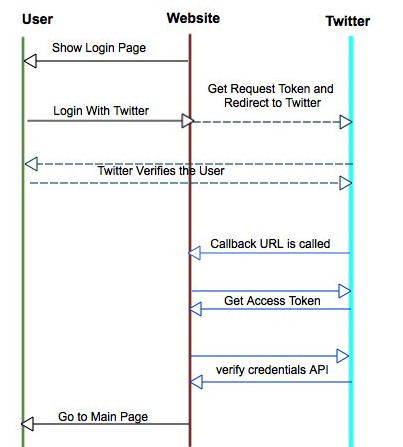
1) “Login With Twitter” button is shown to users. (index.php)
2) When a user clicks on “Login with Twitter”, user is redirected to Twitter. (login.php)
3) Twitter verifies the user credentials.
4) After successful authorization , user is redirected to website with OAuth token. (oauth.php)
5) Using OAuth token, website gets the access token. (oauth.php)
6) Using Access token, website gets the user info by making a API call.(oauth.php)


You need to follow the below steps for making “Login with Twitter”
Get Twitter API Consumer Key and Consumer Secret.
1) Login to twitter and access https://dev.twitter.com/apps/new. Fill the below details and create app:
- Name: Your application Name. This is shown to user while authorizing.
- Description: Your application Description.This is shown to user while authorizing.
- Website: Your application website.
- Callback URL(*): After authorization, this URL is called with oauth_token

2) After creating app, you can see “Consumer Key” and “Consumer Secret”.

How to query Twitter OAuth API using PHP:
Once your are ready with Consumer Key and Consumer Secret, you can make OAuth API calls.
1) Configure your app (config.php)
<?php

$CONSUMER_KEY='YOUR_KEY';
$CONSUMER_SECRET='YOUR_SECRET';
$OAUTH_CALLBACK='YOUR_CALLBACK_URL';

?>
2) Get a Request token from twitter (login.php)
<?php

$connection = new TwitterOAuth($CONSUMER_KEY, $CONSUMER_SECRET);
$request_token = $connection->getRequestToken($OAUTH_CALLBACK); //get Request Token

if(	$request_token)
{
	$token = $request_token['oauth_token'];
	$_SESSION['request_token'] = $token ;
	$_SESSION['request_token_secret'] = $request_token['oauth_token_secret'];

	switch ($connection->http_code)
	{
		case 200:
			$url = $connection->getAuthorizeURL($token);
			//redirect to Twitter .
	    	header('Location: ' . $url);
		    break;
		default:
		    echo "Coonection with twitter Failed";
	    	break;
	}

}
else //error receiving request token
{
	echo "Error Receiving Request Token";
}
?>
3) Get access_token using request_token and request_token_secret. After getting access token, we can query Twitter API.
Use https://dev.twitter.com/docs/api/1.1/get/account/verify_credentials API to validate the user. (oauth.php)
<?php

//oauth.php. Your callback File

if(isset($_GET['oauth_token']))
{

	$connection = new TwitterOAuth($CONSUMER_KEY, $CONSUMER_SECRET, $_SESSION['request_token'], $_SESSION['request_token_secret']);
	$access_token = $connection->getAccessToken($_REQUEST['oauth_verifier']);
	if($access_token)
	{
		$connection = new TwitterOAuth($CONSUMER_KEY, $CONSUMER_SECRET, $access_token['oauth_token'], $access_token['oauth_token_secret']);
		$params =array();
		$params['include_entities']='false';
		$content = $connection->get('account/verify_credentials',$params);

		if($content && isset($content->screen_name) && isset($content->name))
		{
			$_SESSION['name']=$content->name;
			$_SESSION['image']=$content->profile_image_url;
			$_SESSION['twitter_id']=$content->screen_name;

			//redirect to main page. Your own
			header('Location: login.php');

		}
		else
		{
		       echo "<h4> Login Error </h4>";
		}
	}

else
{

	echo "<h4> Login Error </h4>";
}
?>
