
In jQuery Progress bar example, I am going to demonstrate how to make a simple jQuery animated progress bar with percentage.
Follow the below steps to make progress bar like shown in the below image.
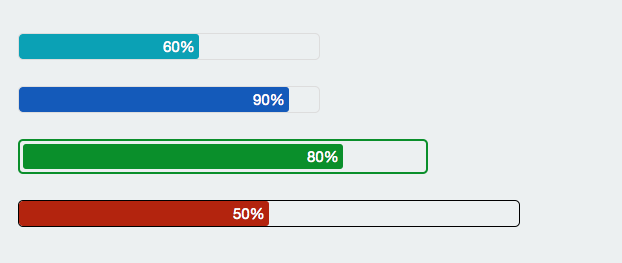
Step 1: Add jQuery to your HTML
<script src="http://ajax.googleapis.com/ajax/libs/jquery/1.10.1/jquery.min.js"></script>
Step 2: Add a div (container) to body with the following CSS.
<div class="container"></div>
.container{
    width: 300px;
    border: 1px solid #ddd;
    border-radius: 5px;
    overflow: hidden;
    display:inline-block;
    margin:0px 10px 5px 5px;
    vertical-align:top;
}
Step 3: Append a div(progressbar) to container(div) with the following CSS.
<div class="container"><div class="progressbar"></div></div>
.progressbar {
    color: #fff;
    text-align: right;
    height: 25px;
    width: 0;
    background-color: #0ba1b5;
    border-radius: 3px;
}
Step 4: Whenever you want to change the progress, change the width of progress bar
function setProgress(progress)
{
	var progressBarWidth =progress*$(".container").width()/ 100;
	$(".progressbar").width(progressBarWidth).html(progress + "% ");
}
You can see the Output here: Click Here
Step 5: We can convert the above code to a jQuery plugin.
(function ($) {
    $.fn.progressbar = function (options)
    {
        var settings = $.extend({
        width:'300px',
        height:'25px',
        color:'#0ba1b5',
        padding:'0px',
        border:'1px solid #ddd'},options);

        //Set css to container
        $(this).css({
        	'width':settings.width,
        	'border':settings.border,
        	'border-radius':'5px',
        	'overflow':'hidden',
        	'display':'inline-block',
        	'padding': settings.padding,
        	'margin':'0px 10px 5px 5px'
        	});

        // add progress bar to container
        var progressbar =$("<div></div>");
        progressbar.css({
        'height':settings.height,
        'text-align': 'right',
        'vertical-align':'middle',
     	'color': '#fff',
		'width': '0px',
		'border-radius': '3px',
		'background-color': settings.color
        });

        $(this).append(progressbar);

        this.progress = function(value)
        {
        	var width = $(this).width() * value/100;
        	progressbar.width(width).html(value+"% ");
        }
        return this;
    };

}(jQuery));
Note: After minify, jQuery progress bar plugin size is < 1KB.
jQuery Progress bar is ready now, below are the examples how to use it.
var bar1 = $("#progress1").progressbar();
bar1.progress(60);

var bar2 = $("#progress2").progressbar({color:'#145ABA'});
bar2.progress(90);

var bar3 = $("#progress3").progressbar({width:'400px',color:'#0A8F2B',border:'2px solid #0A8F2B',padding:'3px'});
bar3.progress(80);

var bar4 =$("#progress4").progressbar({width:'500px',color:'#B3240E',border:'1px solid #000000'});
bar4.progress(50);

You can clone the script from : Github
