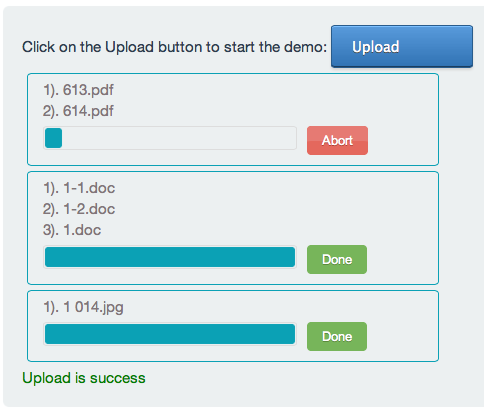
In jQuery Multiple File Upload tutorial, I have covered how to implement Multiple File Upload with progress bar. I have used Upload File plugin for multiple file uploads.


Before starting the tutorial, we need to know the usage of jQuery Upload File Plugin.
jQuery Upload File Plugin Syntax:
var settings = {
	url: "YOUR_MULTIPE_FILE_UPLOAD_URL",
	method: "POST",
	allowedTypes:"jpg,png,gif,doc,pdf",
	fileName: "myfile",
	multiple: true,
	onSuccess:function(files,data,xhr)
	{
		//files: list of files uploaded
		//data: response from server
		//xhr : jquer xhr object
	},
	onError: function(files,status,errMsg)
	{
		//files: list of files
		//status: error status
		//errMsg: error message
	}
};

var uploadObj = $("#uploadDivId").uploadFile(settings);
url : Server URL which handles multiple file uploads.
method: Form method type. Default is “POST”.
enctype: Form enctype. Default is “multipart/form-data”.
formData: Extra data should be send with File.
allowedTypes : Allowed File extensions. Example: “jpg,png,gif”.
fileName : Input file name.
multiple : set true, for multiple file uploads.
onSuccess : this function is called when file upload is success.
onError : this function is called when file upload is failed.
Follow the below steps, to make jQuery Multiple File upload with progress-bar.
1). Add the Below code in head tag.
<link href="https://rawgithub.com/hayageek/jquery-upload-file/master/css/uploadfile.css" rel="stylesheet">
<script src="http://ajax.googleapis.com/ajax/libs/jquery/1.10.1/jquery.min.js"></script>
<script src="https://rawgithub.com/hayageek/jquery-upload-file/master/js/jquery.uploadfile.min.js"></script>
2). Add a div in the body to handle file uploads.
<div id="mulitplefileuploader">Upload</div>
3). When the document is ready initialize the plugin.
var settings = {
	url: "YOUR_MULTIPE_FILE_UPLOAD_URL",
	method: "POST",
	allowedTypes:"jpg,png,gif,doc,pdf,zip",
	fileName: "myfile",
	multiple: true,
	onSuccess:function(files,data,xhr)
	{
		alert("Upload success");
	},
	onError: function(files,status,errMsg)
	{
		alert("Upload Failed");
	}
}

$("#mulitplefileuploader").uploadFile(settings);
Putting It All Together: multiplefileupload.html
<!DOCTYPE html>
<html lang="en">
<head>
<meta charset="utf-8">
<link href="https://rawgithub.com/hayageek/jquery-upload-file/master/css/uploadfile.css" rel="stylesheet">
<script src="http://ajax.googleapis.com/ajax/libs/jquery/1.10.1/jquery.min.js"></script>
<script src="https://rawgithub.com/hayageek/jquery-upload-file/master/js/jquery.uploadfile.min.js"></script>
</head>
<body>

<div id="mulitplefileuploader">Upload</div>

<div id="status"></div>
<script>

$(document).ready(function()
{

var settings = {
	url: "YOUR_MULTIPE_FILE_UPLOAD_URL",
	method: "POST",
	allowedTypes:"jpg,png,gif,doc,pdf,zip",
	fileName: "myfile",
	multiple: true,
	onSuccess:function(files,data,xhr)
	{
		$("#status").html("<font color='green'>Upload is success</font>");

	},
	onError: function(files,status,errMsg)
	{
		$("#status").html("<font color='red'>Upload is Failed</font>");
	}
}
$("#mulitplefileuploader").uploadFile(settings);

});
</script>
</body>
Note: PHP code which handles multiple files is available in “Downloads”
Note: If you need more info about jQuery File Upload Plugin: http://hayageek.com/docs/jquery-upload-file.php