
In Drag and Drop File Upload jQuery example, I have explained how to implement drag and drop file upload using HTML5 and jQuery AJAX API.
Drag and drop is supported only in HTML5 browsers. Supported Browsers are: IE 10+ , Firefox ,Chrome , Safari, Opera.

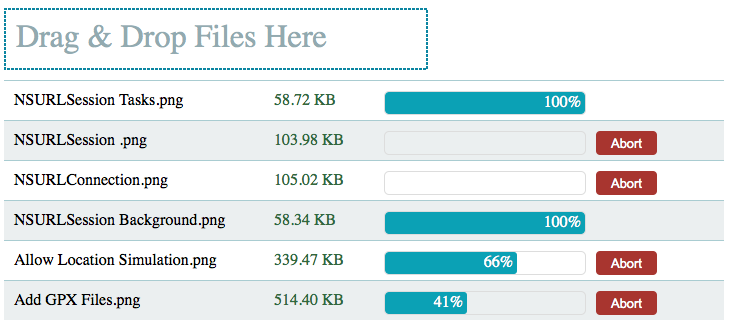
Follow the steps to make drag and drop file upload as shown in the above image.
Step 1). Add jQuery library to your HTML
<script src="http://ajax.googleapis.com/ajax/libs/jquery/1.10.1/jquery.min.js"></script>
Step 2). Add a div tag to body which handles file uploads
<div id="dragandrophandler">Drag & Drop Files Here</div>
We can add some style to div using below CSS.
#dragandrophandler
{
border:2px dotted #0B85A1;
width:400px;
color:#92AAB0;
text-align:left;vertical-align:middle;
padding:10px 10px 10 10px;
margin-bottom:10px;
font-size:200%;
}
Step 3). Handle drag and drop events with jQuery
var obj = $("#dragandrophandler");
obj.on('dragenter', function (e)
{
    e.stopPropagation();
    e.preventDefault();
    $(this).css('border', '2px solid #0B85A1');
});
obj.on('dragover', function (e)
{
     e.stopPropagation();
     e.preventDefault();
});
obj.on('drop', function (e)
{

     $(this).css('border', '2px dotted #0B85A1');
     e.preventDefault();
     var files = e.originalEvent.dataTransfer.files;

     //We need to send dropped files to Server
     handleFileUpload(files,obj);
});
If the files are dropped outside the div, file is opened in the browser window. To avoid that we can prevent ‘drop’ event on document.
$(document).on('dragenter', function (e)
{
    e.stopPropagation();
    e.preventDefault();
});
$(document).on('dragover', function (e)
{
  e.stopPropagation();
  e.preventDefault();
  obj.css('border', '2px dotted #0B85A1');
});
$(document).on('drop', function (e)
{
    e.stopPropagation();
    e.preventDefault();
});
Step 4) Read the file contents using HTML5 FormData() when the files are dropped.
function handleFileUpload(files,obj)
{
   for (var i = 0; i < files.length; i++)
   {
        var fd = new FormData();
        fd.append('file', files[i]);

        var status = new createStatusbar(obj); //Using this we can set progress.
        status.setFileNameSize(files[i].name,files[i].size);
        sendFileToServer(fd,status);

   }
}
Step 5) Send FormData() to Server using jQuery AJAX API
function sendFileToServer(formData,status)
{
    var uploadURL ="http://hayageek.com/examples/jquery/drag-drop-file-upload/upload.php"; //Upload URL
    var extraData ={}; //Extra Data.
    var jqXHR=$.ajax({
            xhr: function() {
            var xhrobj = $.ajaxSettings.xhr();
            if (xhrobj.upload) {
                    xhrobj.upload.addEventListener('progress', function(event) {
                        var percent = 0;
                        var position = event.loaded || event.position;
                        var total = event.total;
                        if (event.lengthComputable) {
                            percent = Math.ceil(position / total * 100);
                        }
                        //Set progress
                        status.setProgress(percent);
                    }, false);
                }
            return xhrobj;
        },
        url: uploadURL,
        type: "POST",
        contentType:false,
        processData: false,
        cache: false,
        data: formData,
        success: function(data){
            status.setProgress(100);

            //$("#status1").append("File upload Done<br>");
        }
    });

    status.setAbort(jqXHR);
}
Putting All together: Drag and Drop File Upload jQuery Example
<html>
<head>
<script src="http://ajax.googleapis.com/ajax/libs/jquery/1.10.1/jquery.min.js"></script>
<style>
#dragandrophandler
{
border:2px dotted #0B85A1;
width:400px;
color:#92AAB0;
text-align:left;vertical-align:middle;
padding:10px 10px 10 10px;
margin-bottom:10px;
font-size:200%;
}
.progressBar {
    width: 200px;
    height: 22px;
    border: 1px solid #ddd;
    border-radius: 5px;
    overflow: hidden;
    display:inline-block;
    margin:0px 10px 5px 5px;
    vertical-align:top;
}

.progressBar div {
    height: 100%;
    color: #fff;
    text-align: right;
    line-height: 22px; /* same as #progressBar height if we want text middle aligned */
    width: 0;
    background-color: #0ba1b5; border-radius: 3px;
}
.statusbar
{
    border-top:1px solid #A9CCD1;
    min-height:25px;
    width:700px;
    padding:10px 10px 0px 10px;
    vertical-align:top;
}
.statusbar:nth-child(odd){
    background:#EBEFF0;
}
.filename
{
display:inline-block;
vertical-align:top;
width:250px;
}
.filesize
{
display:inline-block;
vertical-align:top;
color:#30693D;
width:100px;
margin-left:10px;
margin-right:5px;
}
.abort{
    background-color:#A8352F;
    -moz-border-radius:4px;
    -webkit-border-radius:4px;
    border-radius:4px;display:inline-block;
    color:#fff;
    font-family:arial;font-size:13px;font-weight:normal;
    padding:4px 15px;
    cursor:pointer;
    vertical-align:top
    }
</style>
</head>

<body>
<div id="dragandrophandler">Drag & Drop Files Here</div>
<br><br>
<div id="status1"></div>
<script>
function sendFileToServer(formData,status)
{
    var uploadURL ="http://hayageek.com/examples/jquery/drag-drop-file-upload/upload.php"; //Upload URL
    var extraData ={}; //Extra Data.
    var jqXHR=$.ajax({
            xhr: function() {
            var xhrobj = $.ajaxSettings.xhr();
            if (xhrobj.upload) {
                    xhrobj.upload.addEventListener('progress', function(event) {
                        var percent = 0;
                        var position = event.loaded || event.position;
                        var total = event.total;
                        if (event.lengthComputable) {
                            percent = Math.ceil(position / total * 100);
                        }
                        //Set progress
                        status.setProgress(percent);
                    }, false);
                }
            return xhrobj;
        },
    url: uploadURL,
    type: "POST",
    contentType:false,
    processData: false,
        cache: false,
        data: formData,
        success: function(data){
            status.setProgress(100);

            $("#status1").append("File upload Done<br>");
        }
    });

    status.setAbort(jqXHR);
}

var rowCount=0;
function createStatusbar(obj)
{
     rowCount++;
     var row="odd";
     if(rowCount %2 ==0) row ="even";
     this.statusbar = $("<div class='statusbar "+row+"'></div>");
     this.filename = $("<div class='filename'></div>").appendTo(this.statusbar);
     this.size = $("<div class='filesize'></div>").appendTo(this.statusbar);
     this.progressBar = $("<div class='progressBar'><div></div></div>").appendTo(this.statusbar);
     this.abort = $("<div class='abort'>Abort</div>").appendTo(this.statusbar);
     obj.after(this.statusbar);

    this.setFileNameSize = function(name,size)
    {
        var sizeStr="";
        var sizeKB = size/1024;
        if(parseInt(sizeKB) > 1024)
        {
            var sizeMB = sizeKB/1024;
            sizeStr = sizeMB.toFixed(2)+" MB";
        }
        else
        {
            sizeStr = sizeKB.toFixed(2)+" KB";
        }

        this.filename.html(name);
        this.size.html(sizeStr);
    }
    this.setProgress = function(progress)
    {
        var progressBarWidth =progress*this.progressBar.width()/ 100;
        this.progressBar.find('div').animate({ width: progressBarWidth }, 10).html(progress + "% ");
        if(parseInt(progress) >= 100)
        {
            this.abort.hide();
        }
    }
    this.setAbort = function(jqxhr)
    {
        var sb = this.statusbar;
        this.abort.click(function()
        {
            jqxhr.abort();
            sb.hide();
        });
    }
}
function handleFileUpload(files,obj)
{
   for (var i = 0; i < files.length; i++)
   {
        var fd = new FormData();
        fd.append('file', files[i]);

        var status = new createStatusbar(obj); //Using this we can set progress.
        status.setFileNameSize(files[i].name,files[i].size);
        sendFileToServer(fd,status);

   }
}
$(document).ready(function()
{
var obj = $("#dragandrophandler");
obj.on('dragenter', function (e)
{
    e.stopPropagation();
    e.preventDefault();
    $(this).css('border', '2px solid #0B85A1');
});
obj.on('dragover', function (e)
{
     e.stopPropagation();
     e.preventDefault();
});
obj.on('drop', function (e)
{

     $(this).css('border', '2px dotted #0B85A1');
     e.preventDefault();
     var files = e.originalEvent.dataTransfer.files;

     //We need to send dropped files to Server
     handleFileUpload(files,obj);
});
$(document).on('dragenter', function (e)
{
    e.stopPropagation();
    e.preventDefault();
});
$(document).on('dragover', function (e)
{
  e.stopPropagation();
  e.preventDefault();
  obj.css('border', '2px dotted #0B85A1');
});
$(document).on('drop', function (e)
{
    e.stopPropagation();
    e.preventDefault();
});

});
</script>
</body>
</html>
Reference: FormData Browser Support
